Turn any document into rows.
DataDustie reads each document on its own and puts every table line and every clause on its own row. No templates to build, no AI call for every page, and every value traced back to where it came from.
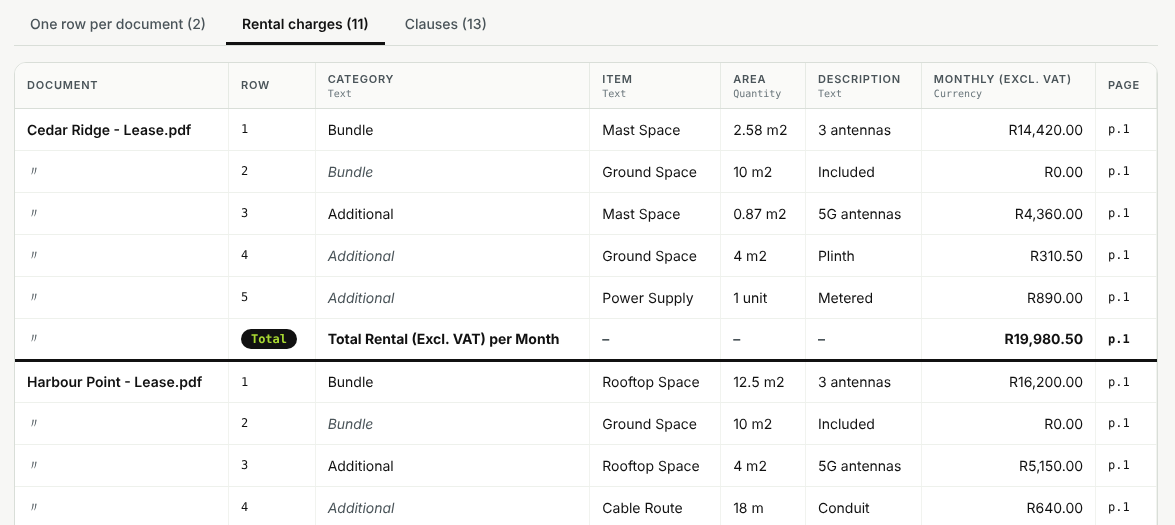
Two leases, one table. Each line of each rental schedule is its own row, with merged cells filled in and totals marked. Sample documents.
Documents are not all shaped the same.
Most extraction tools ask you to define one framework and then bend every document to fit it. The moment a document is written differently, fields go missing and tables collapse into a single cell.
The usual way
- One fixed template per document type
- A whole table squeezed into one cell
- Merged cells and totals break the output
- A model reads every page, every time
- Hard to say where a number came from
With DataDustie
- The extraction is designed from each document itself
- Every table line and clause is its own row
- Merged cells are filled in, totals are marked
- Code runs the recipe, so reading costs no tokens
- Each value shows its page and the words around it
Design once. Run forever.
DataDustie separates thinking from doing. The design is worked out from the document. After that, plain code does the reading.
Add documents
Drop in files, or connect a Google Drive folder. A thousand documents is the same job as one.
It reads each one
Labels, parties, dates, amounts, tables and numbered clauses are found from how that document is written.
Code proves it
Every field is run back on the document. If it does not return the same value from the same page, it is not kept.
Rows, everywhere
Sort and group in the table, export to Excel with a sheet per table, or send it all to Airtable.
Built for the messy parts.
Every line on its own row
A table with merged cells, a total row and a note underneath becomes clean rows. Merged cells are filled into every row they cover, totals stay marked as totals, and numbered clauses get one row each.
Unique to every document
Nothing is forced into a template. DataDustie reads how each document is written and builds the extraction from its own labels, tables and wording. Drop in a lease, an invoice and a policy and each is read as itself.
Similar tables stack together
The rental charges of ten different leases land in one table, side by side, with the document named on every row. A field only one document has simply gets its own column.
Folders in, Airtable out
Connect a Google Drive folder and DataDustie reads every new or changed file, skips what it has already done, and sends the rows to Airtable. Re-running updates rows instead of duplicating them.
Every value is proven
Before a field is kept, the code runs it back on the document and checks it returns the same value from the same page. You can see where each number came from.
Code does the work, not tokens
The recipe for a document is plain, readable JSON. Reading a document costs no AI calls, so ten pages or ten thousand run fast and cost the same.
From a folder of files to a table you can use.
A bulk job reads every document on its own, groups the ones that share a layout, and shows each table on its own tab.
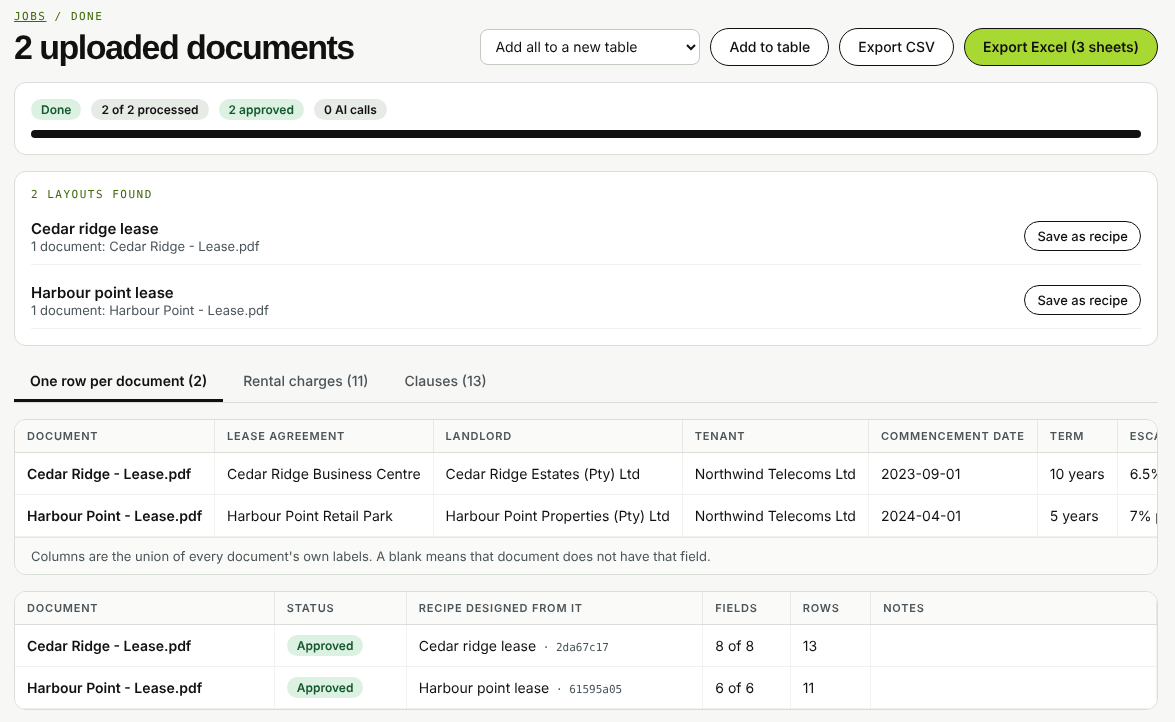
A bulk job: each document gets its own recipe, and matching layouts are grouped.
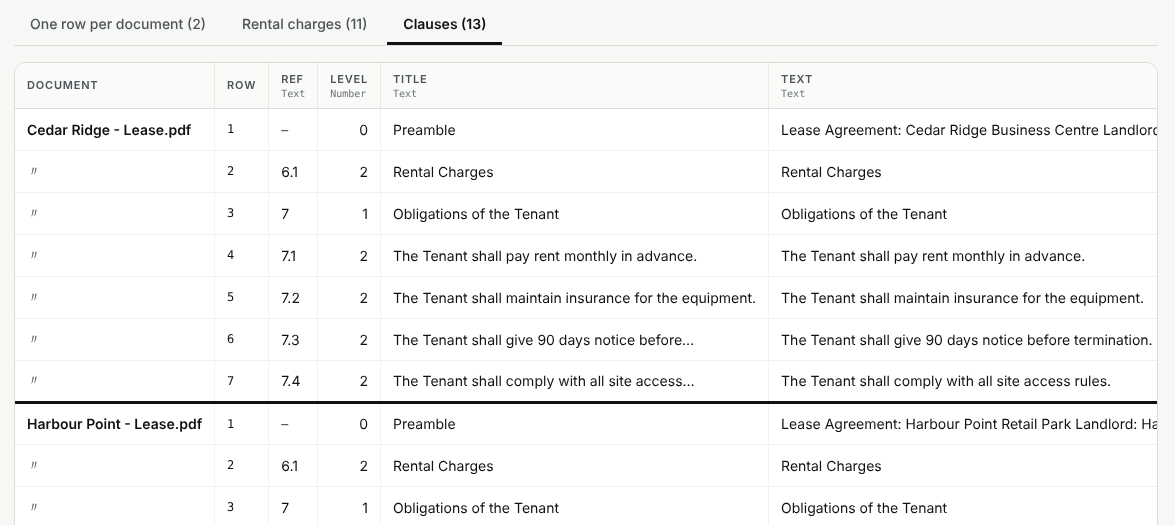
Numbered clauses become rows too: reference, level, title and the full text.
Straight answers.
What kinds of documents can it read?
PDF files with a text layer, Word documents (.docx) and plain text. Scanned documents need OCR, which we are building next, so they are flagged rather than guessed at.
Do I have to set up a template for each document type?
No. That is the point. DataDustie designs the extraction from the document in front of it, so a document type it has never seen still works. When many documents share a layout, they are grouped and processed in bulk.
Does it use AI?
Reading a document is done by code and uses no AI calls. An optional AI step can refine the design for documents written in free prose, such as clauses with no labels. Code then checks everything the model proposes before it is kept.
Where do the rows go?
Into a table you can sort and export to Excel or CSV, with one sheet per table. You can also send them to Airtable, where DataDustie creates the tables and fields for you.
Can it watch a folder?
Yes. Point it at a Google Drive folder or a folder on your computer and run it on demand or on a schedule. It only processes files that are new or have changed.
Is my data safe?
Documents are processed in your own DataDustie workspace and are not used to train models. During early access we are working closely with a small group of teams, and we will share our security and data-handling details before anything sensitive goes in.
Bring us the documents you dread.
We are opening DataDustie to a small group of teams. Tell us what you need to extract and we will set up your workspace and run your first documents with you.
Prefer email? info@digera.ai · Already invited? Open the app